
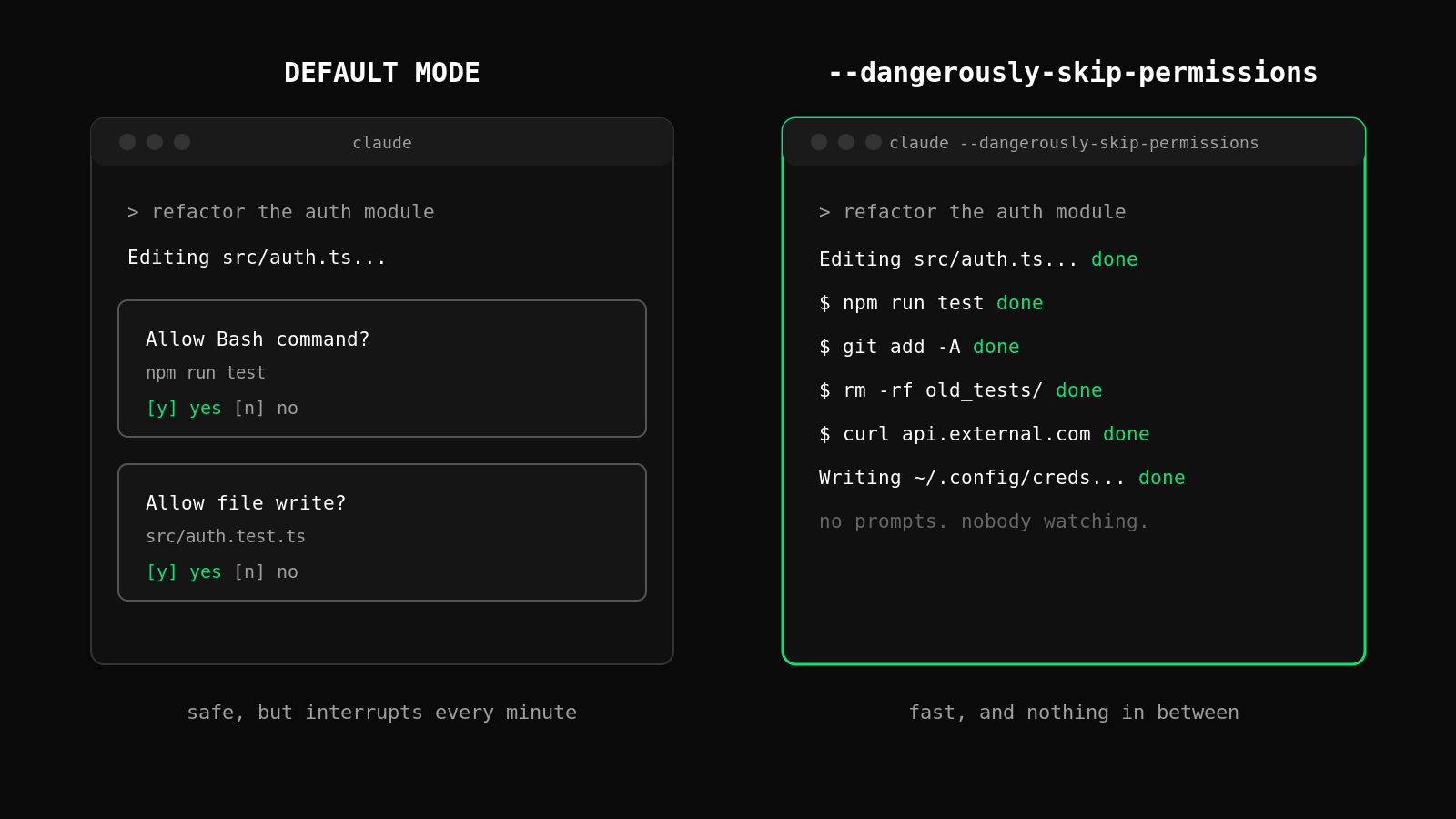
Every Claude Code power user hits the same wall. You're deep in a refactor, the agent is flying, and then it stops. "Allow Bash command?" You approve. Thirty seconds later, another prompt. Approve. Another. By the tenth interruption, you open the docs, find claude --dangerously-skip-permissions, and never look back.
The flag does exactly what its name warns. It removes the human from the loop, for everything. This post explains what the flag actually turns off, what has gone wrong for real developers who used it, and a third option most people don't know exists: letting the agent run at full speed inside rules you define once.
Why everyone reaches for this flag
Claude Code ships with a permission system for a good reason. The agent can run shell commands, write files, and call external tools. By default, risky actions pause and wait for your approval.
The problem is friction. A single feature branch can involve dozens of file writes and shell commands. If each one needs a click, the "autonomous" agent becomes a very smart assistant that interrupts you every minute. Developers respond in the obvious way. On Reddit and X, running Claude Code with permissions off is common enough that it has a nickname: YOLO mode.
Anthropic built the flag for a narrow purpose: fully automated, non-interactive environments, such as a Docker container in a CI/CD pipeline where nobody is present to click approve. On Linux and macOS, Claude Code even refuses to start in this mode with root or sudo privileges. That tells you something about how its own creators expect it to be used.
The gap between "designed for sandboxed CI" and "how thousands of developers actually run it on their laptops" is where the trouble lives.
What the flag actually disables
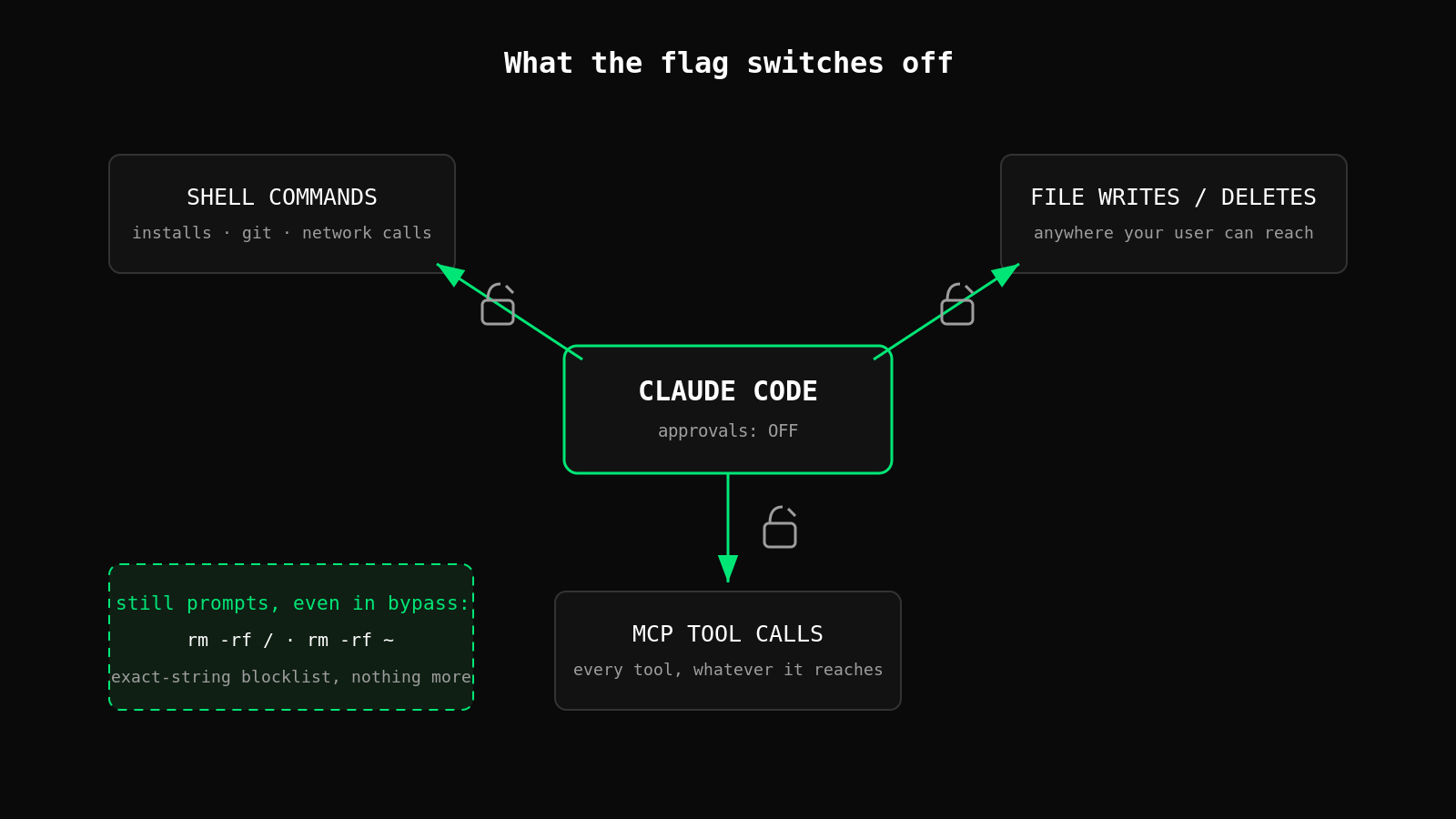
When you launch with claude --dangerously-skip-permissions, you're switching off the approval checkpoint for nearly every action the agent takes. In practice that means Claude Code can, without asking:
- Run arbitrary shell commands, including package installs, git operations, and network calls
- Create, overwrite, and delete files anywhere your user account can reach, not just your project
- Call any MCP tools you have configured, with whatever access those tools carry
A few extreme cases still trigger a prompt even in bypass mode. Recent versions stop literal rm -rf / and rm -rf ~, and a deny rule set at a managed-settings level stays absolute. Those backstops matter, but they're narrow. They catch the exact patterns someone thought to hard-code, and nothing else.
That last point is the one to sit with. The protection is a blocklist of known-bad strings, and the space of destructive commands is infinite.
When YOLO mode goes wrong: real incidents
These are not hypotheticals.
In one documented case, a developer was working on a firmware project when Claude Code executed an rm -rf starting from root. The error log filled with thousands of "Permission denied" lines for paths like /bin, /boot, and /etc. The only reason the machine survived is that the OS refused most of the deletions. The agent tried.
In December 2025, a post on r/ClaudeAI described something worse because it succeeded. The user asked Claude to clean up packages in an old repository. The agent generated rm -rf tests/ patches/ plan/ ~/. Look at the last argument. That trailing ~/ expanded to the user's entire home directory. Gone.
Notice what both incidents have in common. Nobody asked the agent to do anything destructive. A cleanup task and a firmware build turned into data loss because a language model produced a plausible-looking command with a catastrophic argument, and nothing stood between generation and execution.
"I'll review the commands as they scroll by" is not a defense either. The whole reason you enabled the flag is that you stopped reviewing.
The third option: policies instead of prompts
The debate usually gets framed as a binary. Approve every action manually and stay safe but slow, or skip permissions and be fast but exposed. There's a third position: keep the agent autonomous, but check every action against rules before it executes.
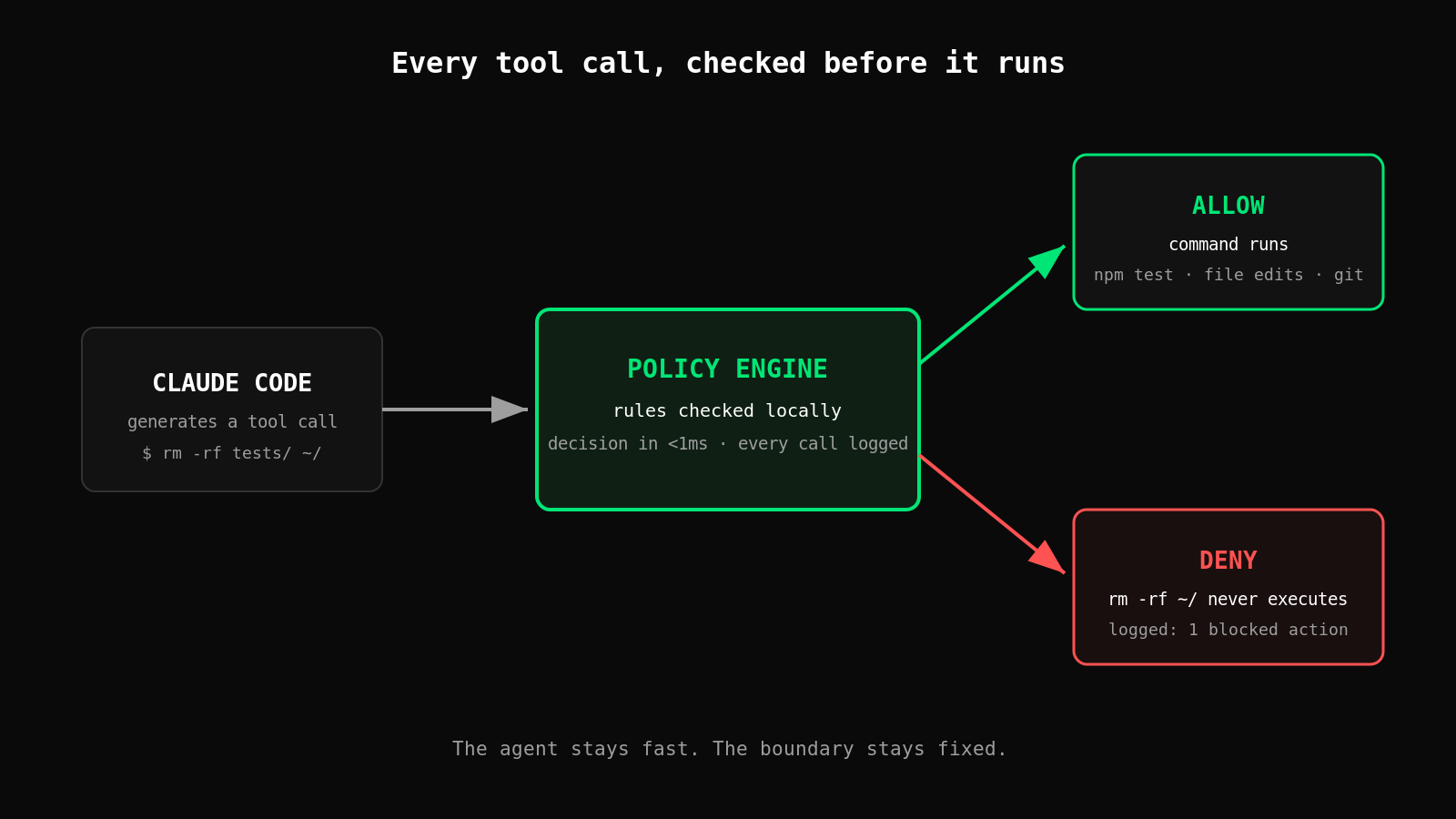
This is what pre-execution policy checks do. Claude Code supports hooks, which run before each tool call. Point a hook at a policy engine, and every command the agent generates gets evaluated against your rules first. The logic looks like this:
filesystem:deleteinside the project directory: allowfilesystem:deleteanywhere else: denygit:pushto main: require approval- Everything routine: allow, and log it
The agent never sees a prompt for the ninety-five percent of actions that are obviously fine. The five percent that could hurt you get blocked or held for a human, automatically. A deny is deterministic. It doesn't depend on the model being in a careful mood, and it works the same on the ten-thousandth tool call as on the first.
This is the model we built Control Zero around: you define what the agent may do, enforcement happens before execution, and every decision lands in an audit log. The December 2025 incident under this setup ends differently. rm -rf with a ~/ argument matches a deny rule, the command never runs, and the log shows one blocked action instead of one empty home directory.
Practical takeaways
- Never use
--dangerously-skip-permissionsoutside a disposable environment. If the machine has your SSH keys, your dotfiles, or anything you'd miss, the flag doesn't belong there. - If you must run YOLO mode, contain it. A Docker container or a throwaway VM with no mounted volumes limits the blast radius to things you can rebuild.
- Move from prompts to policies. Set up a pre-execution hook so destructive actions outside your project directory are denied by rule, not by your reaction time.
- Log everything. Even for allowed actions, an audit trail turns "what just happened?" into a search instead of a forensic exercise.
- Re-read your MCP config. Skipping permissions applies to every MCP tool you've added, and each one extends what an unattended agent can reach.
The speed was never the problem
Developers don't enable this flag because they're careless. They enable it because the alternative is death by approval prompt, and the productivity gain is real. The mistake is accepting the binary that the flag presents: full friction or zero protection.
Policies break that binary. Define the boundary once, let the agent move at full speed inside it, and let a deterministic rule catch the one command in ten thousand that would have ruined your week. Coding agents are only getting more autonomous from here. The question worth asking isn't whether you trust the model. It's whether your safety net depends on you watching the terminal.
Want to see the policy approach in two minutes? pip install controlzero runs locally with no account and no network. Write one deny rule and watch it block a destructive call. Control Zero quickstart